 YouTube Dislike Counter
 User Guide
Installing the extension, choosing how the count is displayed, and fixing the one problem people actually hit: no number on the page.
1. Installing
- Open the extension's page in your browser's store — Chrome Web Store, Microsoft Edge Add-ons or Firefox Add-ons — and add it, then confirm. On Brave, Opera and Vivaldi, use the Chrome Web Store version.
- Reload any YouTube tab you already had open. Tabs opened before the installation keep running without the extension until they are refreshed — this is the single most common reason the count seems to be missing.
- Open a video. The dislike count appears next to the like button within a second or two.
Using Brave, Opera or Vivaldi? Install the Chrome version — it works in every Chromium browser. Edge and Firefox have their own builds.
2. Where the count appears
On a normal watch page the number is placed in YouTube's own like/dislike bar, right of the separator, formatted the way YouTube formats its own counts (4.3K, 1.2M and so on). It loads with the page and refreshes when you click through to the next video, because the extension watches for YouTube's in-page navigation instead of waiting for a full reload.

If you press the dislike button yourself, the number updates immediately to include your vote, exactly as the like counter does.
3. Two display modes
Open the extension's settings — the Settings button in the popup, or the extension's options page — and choose one of two modes:
| Mode | How it looks | Best for |
|---|---|---|
| Inside the button (default) | The number sits inside YouTube's own dislike button, next to the like count. | Anyone who wants it to look exactly like YouTube used to. |
| Floating box | A small box over the player showing the count, independent of YouTube's buttons. | Anyone whose count occasionally disappears after a YouTube redesign, or who wants it bigger. |
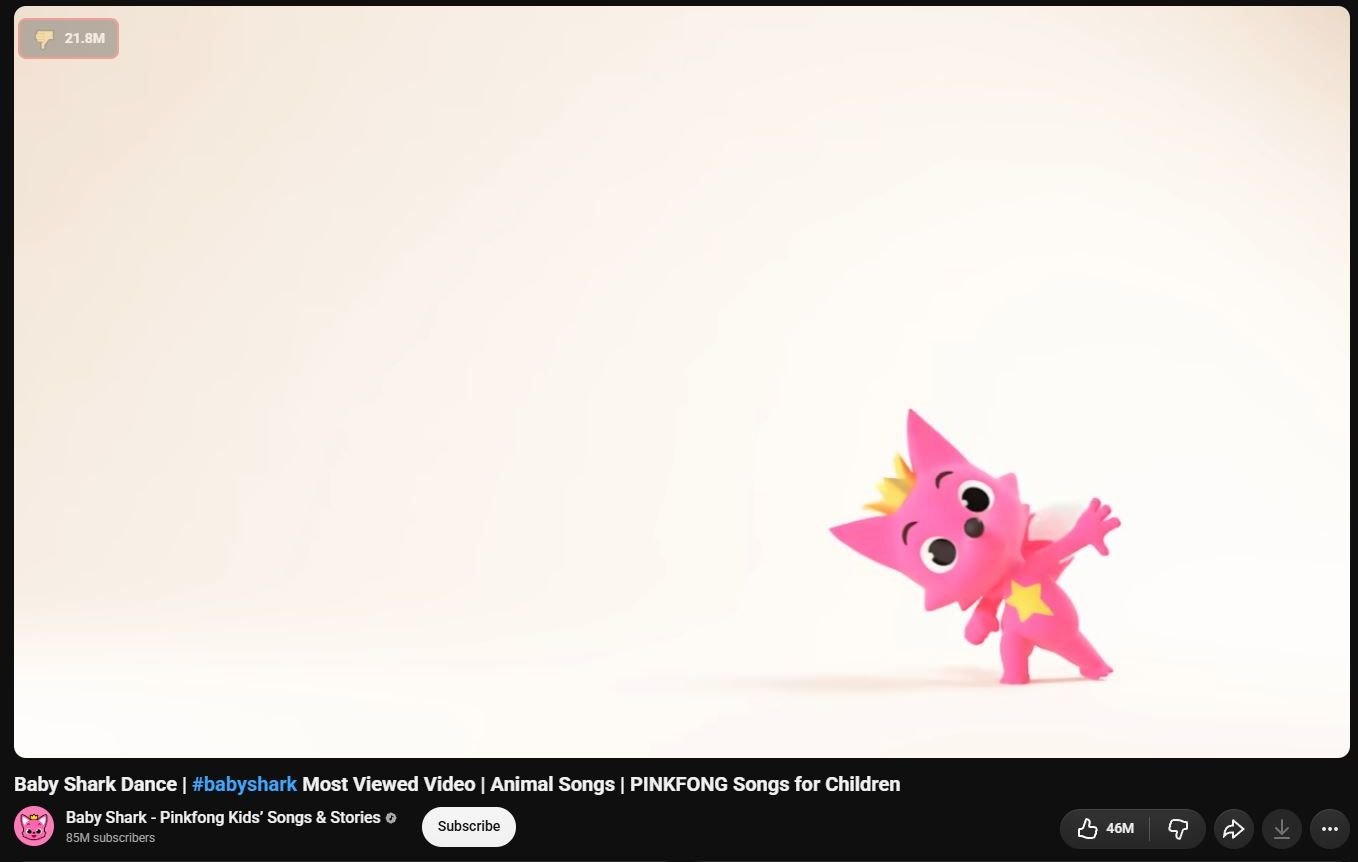
The floating box is the more robust of the two: because it does not depend on finding the right element inside YouTube's button row, it keeps working through layout changes that break the integrated mode. Save the setting and reload the YouTube tab to apply it.
4. Shorts
Shorts have a separate vertical button column, and the extension supports it. Scroll from one Short to the next and the count is placed again for each one. Because Shorts often have far fewer archived votes than long videos, the estimate there is rougher — a Short published today may show a very small number or none at all.
5. The count is not showing
Work through these in order — the first two solve the large majority of cases:
Reload the tab
After an install or an update, tabs that were already open are still running the previous version of the script, or none at all. Press F5 on the YouTube tab. Newer versions reload open YouTube tabs automatically after an update, but a manual refresh is still the fastest fix.
Check for a second dislike extension
Return YouTube Dislike or a similar add-on writes into the same button row. Two extensions competing for one element can result in a duplicated number, or in neither of them succeeding. Open your browser's extensions page, keep one, and disable the other.
Switch to the floating box
If YouTube has just changed its markup, the integrated mode may not find a place to put the number. The floating box does not need one. Switch modes in the settings, reload, and the count comes back.
Look at content blockers and privacy tools
Aggressive blockers, some VPN extensions and strict DNS filtering can block the request that fetches the count. Allow the extension's count service, or pause the blocker on YouTube for a moment to see whether the number reappears.
Tell us — from the popup
On the video where it fails, open the extension popup and press Cannot See Dislike Count. That sends a diagnostic report and shows the number in the popup, so you get your answer immediately and we get the details needed to fix the layout case.
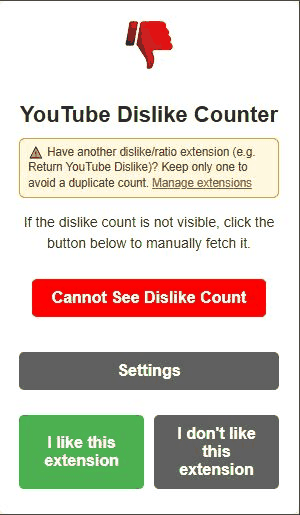
A brand new video with almost no votes can also simply show a very low count. That is not a bug — there is nothing archived for it yet.
6. How accurate are the numbers
The counts are estimates. They combine an archive of the dislike numbers that were publicly visible before November 2021 with votes cast by people using dislike extensions since then. Nobody outside YouTube can see the real current figure, and any extension claiming otherwise is guessing too.
In practice: videos from large channels published before the change are the most accurate; videos published since then rely entirely on extension votes and read low compared to reality; very new uploads and small channels are the least reliable of all. The ratio between likes and dislikes stays informative long after the absolute number has drifted.
7. Uninstalling and reporting problems
To remove the extension, right-click its icon in the toolbar and choose Remove, or open your browser's extensions page and remove it there. Everything it stored on your device goes with it, including the anonymous identifier.
If something is broken, the report from the popup is the fastest route. For anything longer — a layout that never works, a translation error, a feature idea — write to us on the Contact
YouTube is a trademark of Google LLC. This website and the extension are independent projects and are not affiliated with, endorsed by, or sponsored by Google LLC or YouTube. The trademark is used only to describe compatibility.